
Your finance team just wrapped up a vendor audit. The auditor requested 3 contracts, 2 signed purchase orders, and a compliance certificate dated 18 months ago. Someone opens NetSuite, goes to the File Cabinet, and begins digging through folders labeled “Misc Docs 2024” and “Vendor Files - Old.” After 20 minutes, one file is missing. The other one is the wrong version. The audit continues into another day.
This is how poor NetSuite document management creates operational friction for growing businesses, often surfacing during audits, approvals, or compliance reviews.
NetSuite document management (DMS) is the system businesses use to store, organize, retrieve, and manage access to files within a NetSuite environment. When done correctly, it ties documents to the transactions, vendors, and projects they're a part of. When document management relies only on the native File Cabinet, businesses often struggle with version control, searchability, approvals, and operational visibility. In this article, we'll walk through how to avoid exactly that.
The File Cabinet is NetSuite's built-in storage tool. Imagine it is like a shared folder structure within your ERP. Files can be attached, uploaded to folders, assigned folder access levels, and organized into folders.
NetSuite File Cabinet works well for smaller businesses that need basic document attachment and internal file storage. It supports simple folder-based organization and record-level file associations directly within NetSuite.
However, the File Cabinet was not intended to be a complete document management and storage system. As your business grows (more users, more transactions, more document types), its structural constraints begin to interfere with real business operations.
NetSuite's File Cabinet limits file size per upload to 10MB. For companies that work with CAD drawings, high-resolution product photos, large videos, or lengthy multi-page PDFs, that's a big limitation. A single print-quality product brochure can exceed this threshold easily.
Storage capacity is another pressure point. The base File Cabinet starts at 100GB. That sounds sufficient until you calculate annual document volume across AP, AR, HR, procurement, and compliance. Exceed the limit, and you're paying for additional storage tiers at increasing cost.
Beyond size and space, there are deeper structural gaps:
Most businesses don't isolate the cost of poor NetSuite document management. They absorb it as general overhead without running the numbers. As a result, poor NetSuite document management practices cost businesses an estimated $19,732 per information worker annually.
According to the Ponemon Institute and Globalscape, non-compliance with data and document regulations costs organizations an average of $14.82 million, nearly 2.71 times the average cost of maintaining compliance at $5.47 million. For companies that treat NetSuite document management as a low-priority task, that ratio surfaces under audit pressure exactly when poor controls become most expensive.

A proper NetSuite document management system treats documents as part of your business process and not just attachments to it. The core difference is control. Native NetSuite lets you attach files to records, which is a good start. But a proper system adds structure around those attachments, such as:
A purchase order doesn't just have a PDF attached to it; it has a verified, approved, versioned document with a full audit trail behind it. Other capabilities a proper system adds include:
This shift is also visible in the market data. The global document management system market is valued at $11.81 billion in 2026 and is projected to reach $21.39 billion by 2031 at a CAGR of 12.61%, driven by the need for cloud-based, workflow-aware solutions.
For NetSuite users who have outgrown the File Cabinet, Tvarana's SkyDoc SuiteApp solves three primary pain points: storage limits, versioning, and collaboration constraints.
SkyDoc is a NetSuite-native document management solution powered by AWS S3 and Azure cloud storage. Because it installs as a SuiteApp, there is no separate integration to manage. Files appear in a dedicated subtab on any NetSuite record, and users can upload documents via simple drag-and-drop.
Below is a quick comparison table; for a more detailed breakdown, check out our NetSuite File Cabinet vs SkyDoc comparison article.
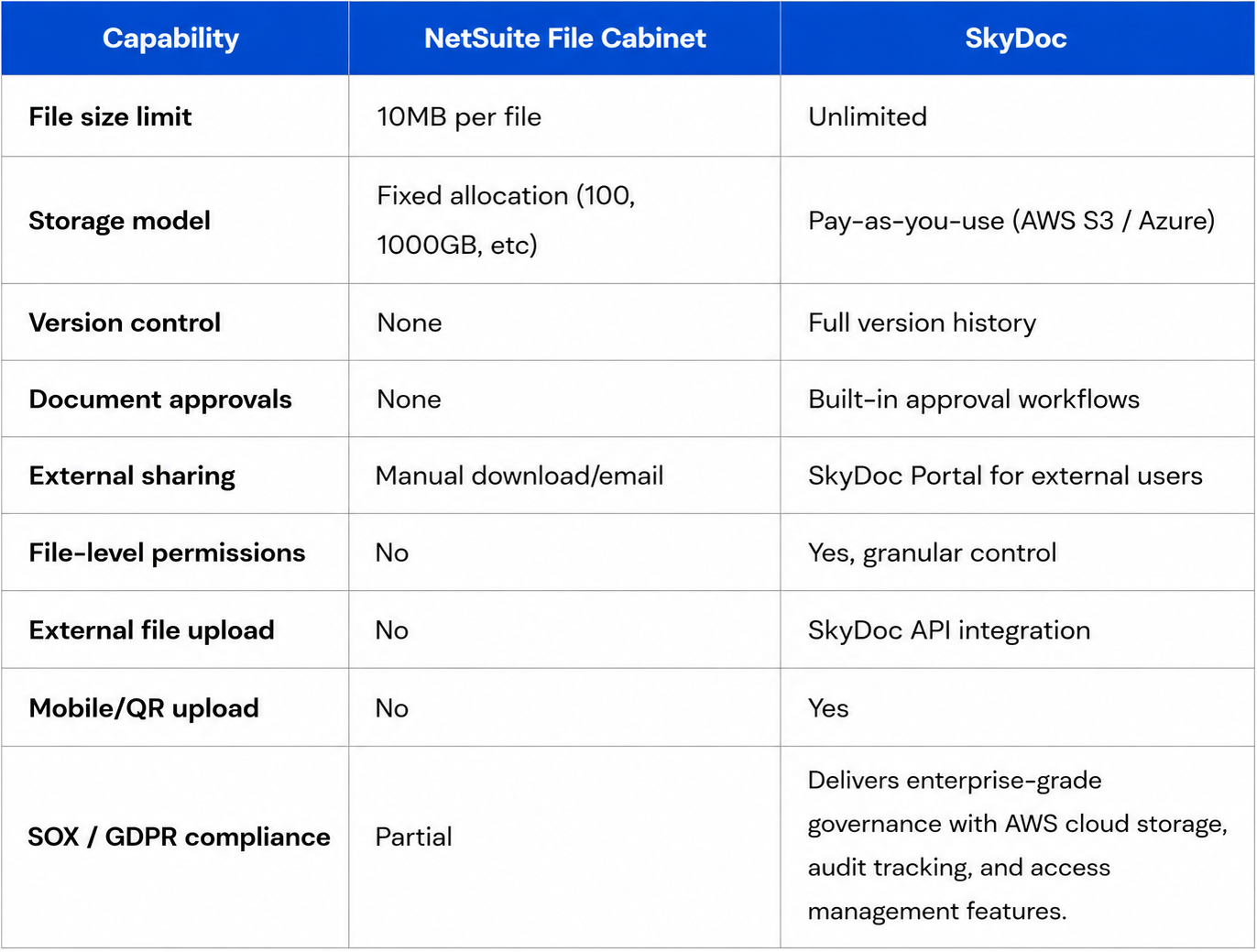
The other upside is the SkyDoc API, which addresses a particular pain point: external document intake. The direct upload feature allows vendors, customers, or field teams to upload documents directly into a NetSuite record without needing a NetSuite login, removing one of the most frequently used manual workarounds teams create around the File Cabinet.
For manufacturers, professional services, or eCommerce companies, SkyDoc replaces the disjointed combination of shared drives, email threads, and manual filing that often comes along with the File Cabinet's shortcomings. Additionally, teams can streamline approvals of files within NetSuite using SkyDoc without using any external workflow tool.
NetSuite document management gives your business the organizational level that makes sure your data is complete, available, and audit-ready. While the File Cabinet takes care of the basics, it simply wasn't built for the scope, compliance, and collaboration needs of scaling businesses.
Tvarana fills in that gap with SkyDoc, which enables unlimited cloud storage, version control, document approval workflows, and external collaboration to be natively integrated into NetSuite. Whether your team is hitting the 10MB file limit, dealing with version confusion, or manually working around external sharing, there's a structured path forward without adding a separate platform.
Explore how file restrictions in the NetSuite File Cabinet compound over time, and contact us if you have any questions and get your SkyDoc implementation started today!



Tvarana is an award-winning
Oracle NetSuite Consulting Firm
and an SDN partner.
info@tvarana.com